Skip to content
 Logo
  • Platform
    • arrow-right-to-bracket
      Visitor management 2.0
      Secure by design, human by nature, Trusted worldwide.
    • person-walking-dashed-line-arrow-right-1
      Smart visitor management
      Always know who is arriving and why before they step through
the door.
    • calendars
      Seamless workspace experience
      Desks, rooms and routes that keep people moving.
    • chart-mixed
      Adaptive compliance & risk management
      Compliance protection in the background so work continues.
    • siren-on
      Predictive safety & emergency response
      Be ready for anything and keep people safe.
    • By complexity
      • home_work
        Small businesses
      • apartment
        Multi-site organizations
      • factory
        Highly-regulated environments
      • account_balance
        Public sector & education
    • By Role / function
      • warehouse
        Operations & Facilities
      • arming_countdown
        Security & Risk
      • tv_signin
        Front Desk & Admin
      • diversity_3
        Compliance & HR
      • network_intel_node
        IT & Implementation
      • groups
        Leadership & Strategy
  • Features
    • ZtmdQ7zzk9ZrXCs1_PageIcons_sia_spaces_ico_012_companion
      Mobile & kiosk sign-in
    • 6581b9e0531ac2845a26c6b2_pre_register
      Employee sign-in
    • Branding-&-localization
      Branding & localization
    • 6581b9db531ac2845a26c6ad_companion
      Companion App
    • signal-stream
      Sign In App Tap
    • green-sparkle
      AI assistant
    • integrations
      Integrations & API
    • scan
      ID scan & safety check
    • evacuation
      Evacuation management
    • 6581b9e1531ac2845a26c6b3_safety_check
      Visitor approvals & risk insights
    Explore all features
  • Pricing
    • paid
      Plans and pricing
    • tablet-button
      Compare stands
    • payments
      Buy now
  • Enterprise
    • bookmark
      Blog
    • news
      Newsroom
    • category_search
      Case studies
    • verified_user
      Data security
  • Company
    • group
      About
    • handshake
      Partners
    • green-sparkle
      AI Approach
    • person_edit
      Careers
    • forum
      Contact us
Login Free trial
Login Free trial
  • Sign In App Tap
  • Sign In Companion
  • Evacuation management
  • Visitor badges
  • Pre-registrations & invites
  • Event management
  • ID scan & identity match
  • Integrations & API
  • Advanced meeting management
  • Advanced visitor approvals
  • AI Assistant
  • Appointment scheduling
  • Assets, classified documents & containers
  • Branding & localization
  • Delivery management
  • Desk & meeting room booking
  • Employee sign in
  • Incident management
  • Mobile & kiosk sign-in
  • Notifications
  • Onboarding & credentials
  • Platform customization
  • Reportable information
  • Reporting
  • Single Sign-On (SSO)
  • Time & attendance
  • Visitor approvals & risk insights
  • Workflows

Advanced meeting management

Meeting management that goes beyond basic bookings

Outlook and other standard tools might reserve a room - but they can’t manage the real-world complexity of modern workplaces. Meetings is built for scale, helping you coordinate across locations, manage recurring bookings, and deliver seamless guest experiences - without the chaos.

Calendar shows 26th September highlighted, with three profile images showing who has signed in that day. To the right, it shows that Meeting Room 1 has been booked from 11:20-12:00, and catering has been confirmed for the meeting.

Solving the gaps standard tools can’t

ZvF_5rVsGrYSvtro_PageIcons_sia_sched_ico_008_mcsch

Standard tools

Standard meeting room tools often cause more problems than they solve - double bookings, clashing calendars, manual catering coordination, no visibility into costs, and no setup or breakdown time. They lack privacy controls for shared spaces and don’t integrate well with other workplace systems.
Handshake logomark basic @3x

Meetings by Sign In App

Meetings simplifies booking with a unified platform for rooms, resources, and people. It automates catering, setup, invites, and scheduling - plus offers cost tracking, conflict detection, and multi-timezone support. With Outlook add-in access, it works for everyone, everywhere.

Smarter scheduling. Seamless coordination.

Smart room booking

ZvF9BbVsGrYSvthi_PageIcons_sia_sched_ico_001_booking
Reserve rooms across sites with conflict detection and built-in setup/teardown time.

Catering & services in one flow

icon new email envelope message
Request catering, AV, facilities support, and more - with automated notifications.

Guest coordination

ZvF9BrVsGrYSvthk_PageIcons_sia_sched_ico_002_prereg
Pre-register visitors ahead of their meeting and give them the VIP treatment when they arrive.

Real-time room availability

ZtmJRrzzk9ZrXCIX_PageIcons_sia_vm_ico_012_spaces
See availability across locations, plus optional display support for outside-the-door panels.

Advanced recurring scheduling

ZtmJRbzzk9ZrXCIV_PageIcons_sia_vm_ico_011_scheduling
Book complex recurring meetings, multi-timezone bookings, and auto-detects cross-site conflicts.

Department-level spend tracking

ZvF9B7VsGrYSvthm_PageIcons_sia_sched_ico_003_arriv
Allocate catering and service costs to the correct department for budgeting and reporting.

Multi-tenant privacy controls

Z-F1yXdAxsiBv0UB_sia_edu_us_ico_002
Shared spaces without exposing calendars or attendee details across tenants.

Session, training & program scheduling

schedule
For large organizations running repeated training, workshops, or program cycles

Digital displays for smarter room booking

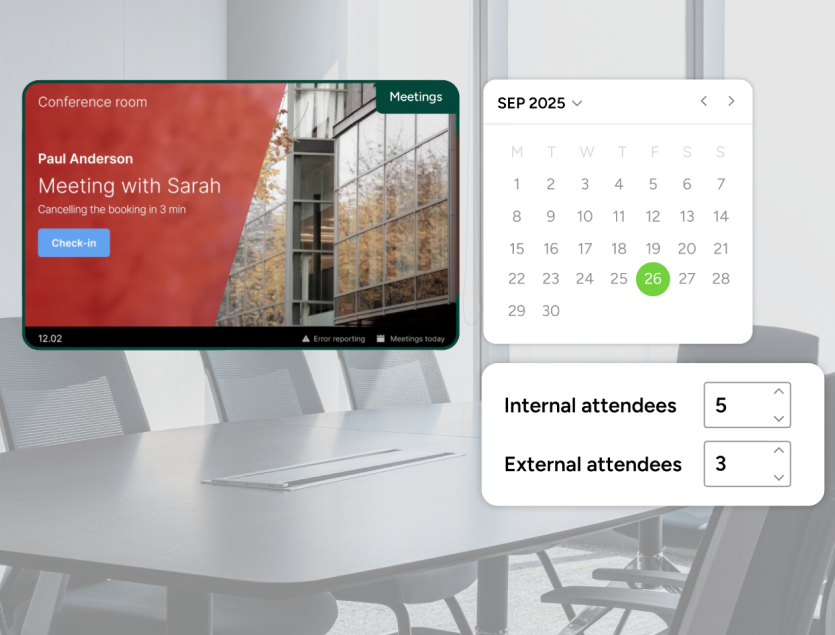
No more mystery meetings. No more awkward knock-knock interruptions. With room display panels, availability is visible the moment you need it, right outside the door.

Connected to Microsoft Exchange, Google Workspace, or Meetings, displays show live availability across your panels and office screens, so teams can see what’s free, what’s booked, and what’s next, without guesswork.

From the panel itself, teams can:

  • Book, check in, or extend meetings in seconds
  • Auto-release empty rooms when no one shows up, freeing wasted space
  • Report issues instantly, sending alerts straight to facilities

Make your rooms work harder and your people waste less time looking for them. Available as a standalone purchase. Talk to our team to get started.
Meetings-2

For organizations managing meetings at scale

End-to-end workflow automation

Manage catering approvals, service routing, VIP handling, role-based access, and custom logic.

Cost centers, auditing & BI integrations

Advanced analytics for usage patterns, spend, and cross-location comparison.

Enterprise calendar connectivity

Deep Outlook integration for high-volume, multi-domain environments with complex IT setups.

Built for every organization

visitor-management-for-small-business-hero

Small businesses

Run professional meetings without overhead.

  • Simple room booking with service requests
  • Clear guest coordination
  • No manual follow-ups
Learn more
multi-site-organisations

Multi-site teams

Coordinate meetings across locations.

  • Cross-site scheduling
  • Shared resource visibility
  • Consistent workflows
Learn more
highly-regulated-environments

High-trust environments

Meetings with higher expectations and controls.

  • Privacy-aware shared spaces
  • Audit-ready records
  • Structured approvals and workflows
Learn more
public-sector-&-education

Public sector & education

Support large programs and shared facilities.

  • Session and training scheduling
  • Multi-tenant privacy controls
  • Campus-wide coordination
Learn more

Related features

Pre-registrations & invites Onboarding & credentials Notifications Incident management Reporting Desk & meeting room booking Evacuation management

Ready to make your meetings smarter?

Plan, run, and review meetings with confidence - without the friction of disconnected tools.
Start free trial Book a demo

Frequently asked questions

Traditional tools reserve a room, but they don’t manage the real operational needs around meetings — services, conflicts, guests, privacy controls, or setup/teardown.
Meetings is designed to manage everything around room bookings—scheduling, catering, AV setup and more - making it ideal for organizing and running meetings across multiple locations. 
It’s ideal for industries that manage a lot of high-cost meetings with internal and external stakeholders, such as professional services, government & public sector, and multi-tenant/shared workspaces.
Spaces, on the other hand, focuses on managing where people work, like desks or day-to-day internal meetings, helping teams reserve workspaces and optimize floor plans in dynamic or hybrid environments. Spaces also doesn’t have the advanced integration capabilities or Display features that Meetings offers. 
In short, Meetings supports how people gather, while Spaces supports where they work
Absolutely. Whether you host meetings on-site, completely remote or a hybrid of the two, Meetings can be tailored to work for you.
Yes. Meetings automatically detects clashes across recurring sequences and suggests alternatives, preventing long-term scheduling conflicts.
Absolutely. You can request catering, AV, facilities setup, and other services during booking - with automated notifications and spend tracking.
Yes. Organizations can share meeting spaces without exposing attendee details, calendars, or sensitive information across tenants.
Yes - digital displays show real-time availability, allow instant booking or check-in, and automatically release empty rooms.
Meetings is available on Enhanced and Pro plans. See pricing here.
  • Platform
    • Visitor management 2.0
    • Smart visitor management
    • Seamless workspace experience
    • Adaptive compliance & risk management
    • Predictive safety & emergency response
  • Solutions
    • Small Businesses
    • Multi-Site Organisations
    • Highly Regulated Environments
    • Education & Public Sector
    • Operations & Facilities
    • Security & Risk
    • Front Desk & Admin
    • Compliance & HR
    • IT & Implementation
    • Leadership & Strategy
  • Features
    • Advanced meeting management
    • Advanced visitor approvals
    • AI assistant
    • Appointment scheduling
    • Branding & localization
    • Companion App
    • Delivery management
    • Desk & meeting room booking
    • Employee sign in
    • Evacuation management
    • Event management
    • ID scan & safety check
    • Incident management
    • Integrations & API
    • Mobile & kiosk sign-in
    • Notifications
    • Onboarding & credentials
    • Pre-registration & invites
    • Platform customization
    • Reporting
    • Sign In App Tap
    • Single Sign-On (SSO)
    • Time & Attendance
    • Visitor approvals
    • Visitor badges
  • Resources
    • Blog
    • Case studies
    • Newsroom
    • Data security
  • Help
    • Login
    • User guide
    • FAQ
    • Beta
    • Legal stuff
    • Cookies
    • System status
    • Trust center
    • Corporate brochure
    • Education brochure
  • Pricing
    • Plans and pricing
    • Compare stands
    • Book a demo
    • Buy now
  • Company
    • The team
    • Partners
    • Careers
    • Contact us
  • Deutsch
  • Español
  • Français
Follow Sign In App on Facebook Follow Sign In App on Instagram Follow Sign In App on LinkedIn Follow Sign In App on X Watch Sign In App on Youtube

Registered Office: 4 Waterside Way, Northampton, England, NN4 7XD - Registration No: 08516772 - Registered in England. ISO27001 Information Security Management - Certificate No. 122520 - US address: Sign In App Inc. 150 2nd Ave N, Suite 1540, St. Petersburg, Florida 33701 (855 615-1590) - EU address: Sign In App, S.L., Paseo Juan Carlos I, 23 (local 11), Edificio Mediterraneo, Marina Botafoch, 07800 Ibiza, Baleares, España (919 26 50 44)

© 2026 Sign In App Ltd is part of the Sign In Solutions suite of brands providing global, cloud-based solutions to manage visitors, employees, workplaces and beyond