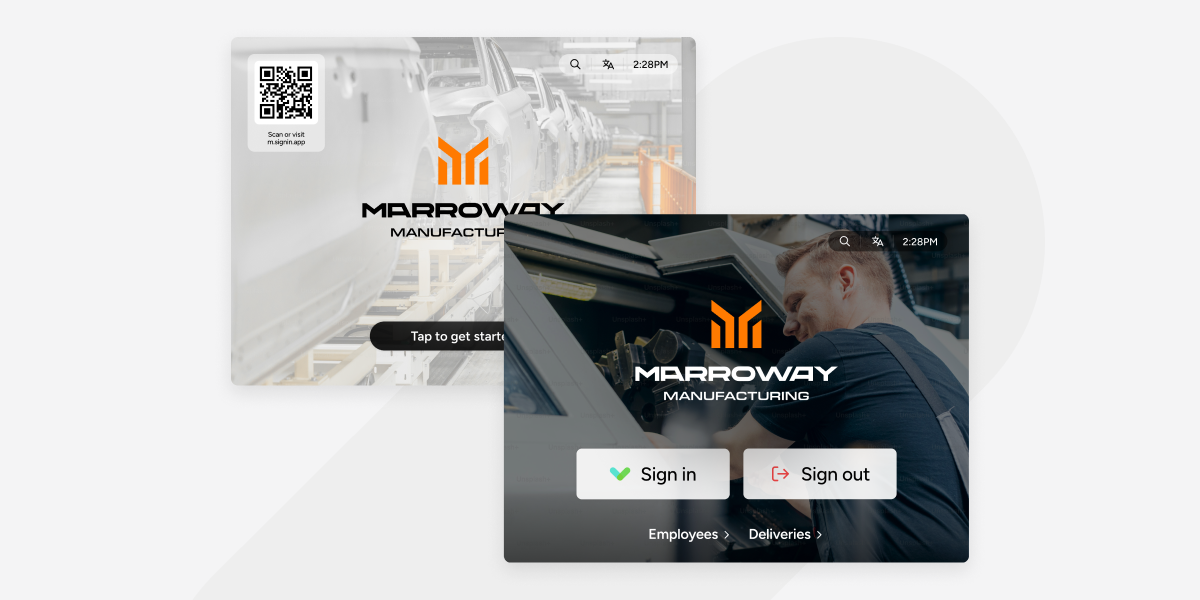
We know how important our iPad app is to our customers. It's the first thing your visitors, contractors and employees see. It has to look great and work every time.
As you may have seen, we recently launched our first ever Android version - rebuilt from the ground up with more customisation options and a faster, smoother experience for everyone signing in. We're calling it Kiosk. And if you missed that one, it's on Google Play now.
Now it's iPad's turn. Version 5 bring the updated Kiosk experience to iPad and it’s our biggest app release since 2020. Here's what's new.
The sign-in experience you know, with more flexibility behind it
The sign-in flow your visitors already know and love stays familiar and intuitive. That's not changing. What is changing is how much control you have over how that experience looks and behaves.
Version 5 says goodbye to the “new” and “old” experience options. You told us they were too restrictive, and we heard you. Instead of choosing between two fixed configurations, you can now customize each option independently and build the kiosk that works for you.
Here's what's new:
- Light and dark mode. Choose the background that suits your environment and your welcome screen design.
- Name entry or grid view. Some teams prefer a scrollable grid with photos, particularly for staff who sign in regularly. Others prefer name entry. You can now set this per group, so each type of visitor or employee gets the experience that works best for them.
- One screen or many. Display all your fields on a single screen or step through them one at a time. One field per screen gives a cleaner, more guided feel. All together can work better on vertical orientations and for visitors who prefer to see everything upfront. Either way, it's your call now.
- Video welcome screens and image slideshows. Available across all configurations now, not just the new experience. Set a single image, a rotating slideshow, or a video, whatever suits your site.
- Brand colours. Until now, you could customize your welcome screen but the buttons stayed SIA green. On Enhanced plans and above, you can now apply your own accent colours throughout the kiosk and make the experience feel fully your own.
- Smoother performance throughout. Transitions are faster and sign-in journeys are snappier. You'll feel it the first time you use it.
Watch a full walkthrough of version 5 in our on-demand webinar here.
Managing your Kiosk from Portal 2.0: the all-new Sign In App experience
Version 5 of our Kiosk app is even better with our all-new web admin experience. Most Kiosk settings can now be configured directly from the new portal experience, without needing to touch the device. Backgrounds, branding, overlays, night mode, language options, contactless settings, home screen controls, display preferences and more, all manageable centrally from one place.
If you've ever had to talk someone through a config change over the phone, you'll know why this is important. Changes that previously required manually scrolling through the settings screen can now happen instantly, across every device running version 5, without leaving your desk.
Remote management is available now for anyone on Portal 2.0 early access. Head to account.signinapp.com to try it. The all-new Sign In App experience will be live for all to try on July 1.
Please note: portal-based Kiosk settings only apply to devices running version 5.
A note on iOS versions
To support the new architecture in version 5, we're raising the minimum supported iOS version from iOS 13 to iOS 16. If any of your iPads are running iOS 13, 14 or 15, they'll need to be updated before upgrading to the new Kiosk.
To check: Settings → General → About. If you're unsure whether your devices are affected, our support team is happy to help.
What's next
Version 5 is built on a new shared codebase with a growing team behind it. As we continue building out the Access Intelligence Platform, Kiosk plays a central role in what that experience looks and feels like for the people walking through your doors every day.
We're looking forward to sharing more over the coming months.
As always, this release has been shaped by the people using Sign In App every day. The flexibility you asked for and the remote management you needed are just two examples of how your feedback shapes what we build. Thank you for being part of it.
.png?width=960&name=Frame%2014711%20(5).png)
.jpg?width=960&name=BLOG%20POST%20IMG%20MAX%20SIZE@2x%20(10).jpg)